Contents
How do I find Photo Requests?
How do I claim a Photo Request?
How many Photo Requests can I claim at a time?
How can I see a list of the photo requests I have claimed?
How do I fulfill a Photo Request?
Can I sort the list of photo requests?
How do I download a list of Photo Requests?
How do I find Photo Requests?
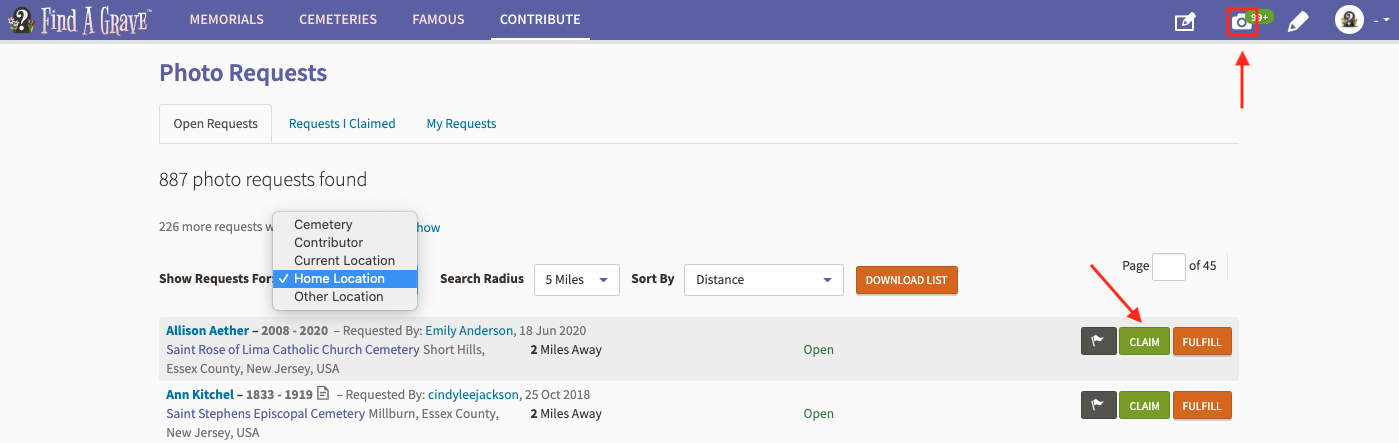
1 Select Photo Requests from either the camera icon or the Contribute page. Use the dropdown menu to show requests by Cemetery, Contributor, Current Location, Other Location, or Volunteer Cemeteries. Depending on your filter choice you can update the search radius to 5, 10, 15, or 50 miles. Use the Sort by dropdown menu to sort the list. You can also look for Photo Requests in a specific cemetery by going to that cemetery page and clicking on Photo Requests. Here are a couple of examples when using the 'Filter By' dropdown.
How do I claim a Photo Request?
1 Select Photo Requests in the top right corner. You can show requests by Cemetery, Contributor, Current Location, Other Location, or Volunteer Cemeteries.
2 If you are willing to photograph a specific grave, select the green ‘Claim’ button and confirm the claim. Once you have claimed a request, you will have 14 days to fulfill the request.
How many Photo Requests can I claim at a time?
A member can claim fifty photo requests at a time.How can I see a list of the photo requests I have claimed?
1 Select Photo Requests
2 Select Requests I Claimed and view the list

How do I fulfill a Photo Request?
A few different options:
- If you received the request as an email, you can follow the link in the email and upload the grave photo.
-
Click on Photo Requests
, select 'Requests I Claimed.' Select
for the memorial you have photographed and upload the grave photo.
- Go to the memorial and select 'Fulfill,' uploading the headstone photo.
- Photo Requests are listed on the specific cemetery page also. Select the #Photo Requests on the cemetery page and you can Fulfill from that list.
Once Fulfilled the member who requested the photo receives an email about the request being fulfilled and the volunteer receives credit on their Profile.
Can I sort the list of photo requests?
Yes, you can sort requests by Memorial Name, Cemetery Name, Requested By, Status, and Distance by selecting an option under Sort By from Photo Requests under Contribute or by Memorial Name, Requested by and Status from the Cemetery Photo Requests.
How do I download a list of Photo Requests?
1 Select Photo Requests
2 Once you have the list displayed, select